Renderwow

The setting of parameters for 3ds Max rendering usually affects the length of rendering time and the quality of the final rendering. The wrong parameter setting can make the render time increasing, several hours or even several times, and you will not satisfy with the final result. In this regard, we provided a set of parameters for the 3ds Max image rendering with the designers using the flash cloud, and you can adjust it flexibly according to your actual situation.
The following vray parameter setting is a high quality parameter, which can reduce the parameters of the designer with low rendering quality. Vray rendering has an invariable rule, the quality is long, the quality is short, it depends on everyone's choice. The parameters are adjusted after the material refinement, and the light subdivision is adjusted. The designers who do not have the subdivision and lighting subdivision have to do adjustment; otherwise the drawing will be more general and may not meet your requirements.
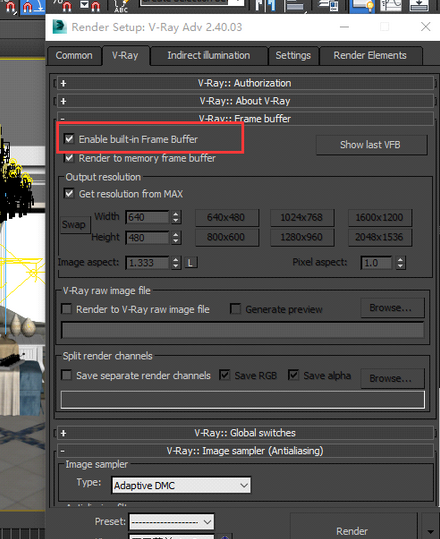
1. V-ray ::Frame buffer roll bar Enable built-in Frame buffer needs to be checked, and the sketch is not checked. The designer can choose to use or not to use according to his or her actual situation, because the screen is slow, and the color is different.
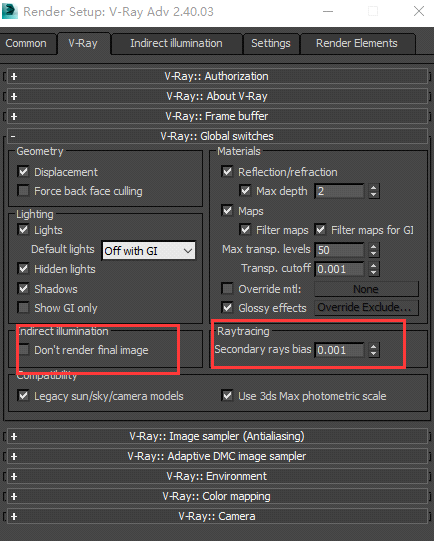
2. v-ray :Global switches, The final image can not be checked, checked to be removed, and Secondary rays bias is set to 0.001.
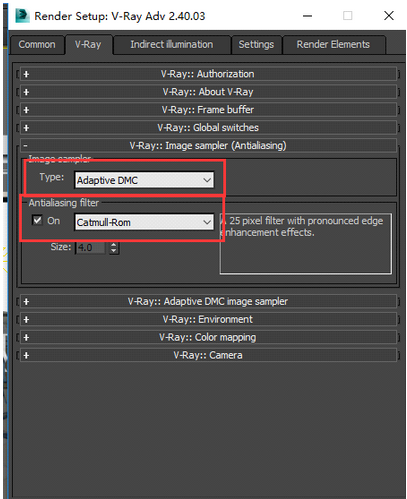
3. v-ray ::Image sampler(Antislisding) scroll bar big picture selects Adaptive DMC, small figure chooses Fixed, Catmull-Rom to render the large drawing when check, the designer chooses according to the actual situation.
4. V-ray :: the Environment volume display bar is turned on or not, which is generally not on, and sometimes requires ambient light setting such as HDRI.
5. V-ray Ray: : Color mapping rollout someone may choose to first exposure, but to make a distinction between linear with index of exposure, exposure in the proposal way using index parameters are the same, check the Sub - pixel mapping and Clamp the output Clamp level two.
6. In Indirect illumination, v-ray :: Indirect illumination(GI) is opened in the roll bar, and Ambient occlusion is opened for a long time, which can enhance the shadow and make the rendering image better. The Subdivs is set to 16, and the designers can also use the later generation of AO channels.
7. In the Indirect illumination, v-ray ::Irradiance map scroll bar Current preset selects Medium, and the High rendering time will be increased; HSph. Subdivs is set to 65, Interp. Samples are set to 45, HSph. Subdivs and Interp. Samples have higher parameters, and the effect picture is more clear, the corresponding rendering time will also be increased. Show cak. Phase needs to be checked.
8. In the Indirect illumination, v-ray :: the Light cache volume display bar Subdivs sets 1400, the maximum cannot exceed 1500, and beyond the time of rendering time, there is no other effect.
9. In Settings, v-ray ::DMC Samoler volume display bar Adaptive amount is set to 0.75, Min samples set to 15, Noise threshold set to 0.001, Global subdivs multiplier default value 1 is good, do not set it to 2, otherwise the time will be doubled. For better effect, you can set it to 1.2.
10, in the Settings, V - Ray: System rollout Max. The tree the depth is set to 100, the Dynamic memory limit is generally set to 8000 MB, because dazzle cloud rendering farm minimum 16 gb of memory, if the designers choose higher memory of the server, you can also set a higher; Show window doesn't check.
Above is a larger parameter which has been set, the designer can be used as a reference, don't comply with the above parameters completely, making appropriate adjustments according to your their actual situation, please check it again carefully when uploading scene own parameter Settings, in order to avoid parameter errors, the rendering time, cause you unnecessary damage to property.


